
Aphelion™ Lab: Image Analysis Software for Non-Experts in Imaging
The image analysis software market has seen many products for advanced users, as well as products limited to specific functions for a specific application. Neither product type effectively addressed the needs of non-experts in imaging science and programming. For these persons, and for those who need to create effective, controlled, laboratory processes to extract data from digital images, now there is a software product to meet all of these needs : Aphelion Lab.
While based on the powerful Aphelion Dev image processing and analysis libraries, Aphelion Lab was specifically designed for use by non-experts in imaging, regardless of the user’s own field of expertise. A set of context-based interfaces guide the user through creation of an image analysis project. This includes steps for digital image acquisition, image processing operator selection and execution, image editing, measurement selection and computation, and analysis report generation. Users can also manually outline objects of interest to compute their shape and size parameters. While useful for virtually all image domains, Aphelion Lab is especially well suited for metrology and microscopy applications.
Settings
All data and measurements generated in the Aphelion Lab environment are automatically managed by the software to ensure high-quality analysis. Only users with administrator rights can configure the software, specifying where results will be saved, setting up the camera device, defining calibration profiles, and selecting the list of measurements to compute on images. Access to all these important settings is password protected. Once the system is fully configured, the user can proceed with analysis of images and concentrate only on the results. All image management tasks, which were cumbersome in the past, are done in a transparent way by the software.
Camera Settings
Since Aphelion Lab complies with the Microsoft DirectShow interface, digital image acquisition in Aphelion Lab is plug-and-play using any DirectShow-compliant camera available on the market. Once the DirectShow driver is installed and a camera connected to the cimputer, a live image can be displayed in the Aphelion Lab interface within a few seconds. The user has only to select the right camera configuration settings and adjust the exposure parameters to acquire high-quality images.
Calibration Settings
A powerful tool enables users to quickly and easily create calibration profiles, which Aphelion Lab uses to report measurements in real-world units for all captured images. Using a pop-up ruler overlaid on an image of a known item (e.g., a micrometer), the user correlates the size of the item in the image (i.e., in pixel units) with its real-world size (e.g., in metric units) to define the calibration profile. There is no limit on the number of calibration profiles that can be saved, enabling the generation of accurate real-world measurements for any calibrated acquisition device used with Aphelion Lab.
Measurement Settings
Aphelion Lab includes a set of object measurements (e.g., length, area, perimeter, max, min). The superuser, who administers Aphelion Lab, selects those measurements that are to be performed automatically during image analysis. More than 50 different measurements can be computed per object, and there is no limit on the number of objects per image or sample. If a calibration profile has been selected, all measurements are provided in real-world units.
Image Acquisition
Capturing an image using image processing/analysis software has never been so easy and intuitive. Select the camera mode (image size and frame rate), define the exposure parameters, start the acquisition to display a live image, focus the camera, apply a shading correction to get an even background, and then capture the image to be analyzed. The current calibration profile is automatically applied to the live image and subsequent images. Images previously captured and stored on media can also be analyzed with Aphelion Lab.
Object Extraction
The Object Extraction task available in Aphelion Lab extracts objects of interest in three steps. First, the user selects the color space and one of the available color channels to process; then the Object Extraction task executes to locate objects in the image. Finally, the user picks one or a combination of the following operations:
- Disconnect objects that are touching or overlapping
- Remove objects touching the image border
- Fill the holes occurring in objects
- Filter objects based on a measurement value specified by the user
A preview of results is always available following each step of the Object Extraction task to enable user adjustment of parameters before execution of the next process.
Object Editing
The Object Editing task provides tools for modifying the set of objects that have been extracted. Adding, removing, and altering objects can be easily performed using mouse operations. An automatic edge tracing tool helps user to quickly and accurately outline the objects. An undo function is always available to go back to the previous step of the editing process. Using these tools, no image is too complex to be analyzed.
Measurements
Object Measurements
Aphelion Lab’s computing of object measurements is very quick and is transparent to the user. Measurements are displayed in a grid format for the objects that were detected or drawn in the previous steps. Grid rows correspond to objects while columns correspond to their measurement values. The interface (see right) displays the grid, its associated image, its objects (as an overlay on the image), and a chart that displays a histogram or scatter plot of object measurement values (i.e., values in a grid column). Any object can be highlighted simultaneously in both the image overlay and the grid by clicking on the object in either the overlay or the object’s row in the grid. Selecting a grid column and clicking the Histogram button will display the histogram for the measurement values in that column. An export feature saves grid data in Microsoft® Excel® or CSV file format.
Interactive Measurements
Interactive measurement tools are also provided that let users draw on an image overlay to quickly and directly compute calibrated measurements. This is especially useful when there are only a few objects to be analyzed. The drawing tools allow the user to draw objects of virtually any shape. The measurements computed for the user-drawn objects are displayed in a simple grid format. Here, the rows correspond to the objects drawn (e.g., lines, angles, circles), the columns correspond to the measurements (e.g., length, angle, area) associated with the drawn objects.
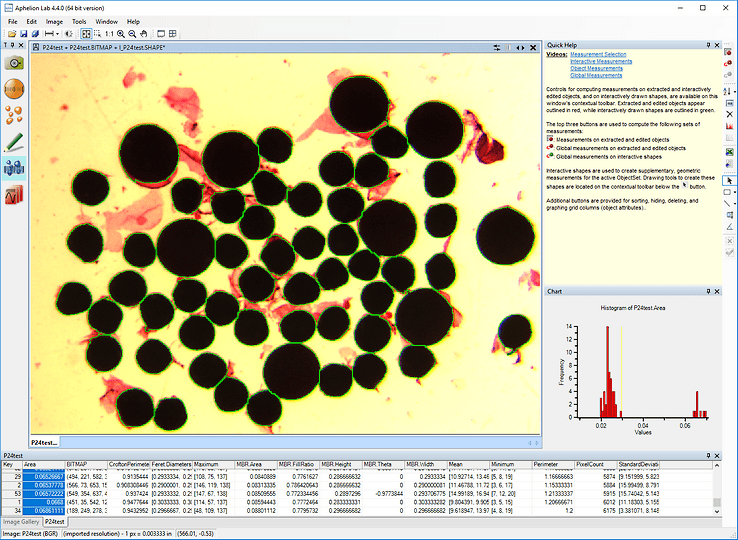
Aphelion Lab graphical user interface - Measurements task
Report Generation
The final step of a typical image analysis project is to generate a report of the results obtained from the analysis. In the past, this was often done by using multiple software products, requiring multiple data exchange steps between the various products. With Aphelion Lab, generating a report can be done in only one steps: Specify the data needed (i.e., measurement grid and image with or without its objects overlay). The report is automatically generated by an Excel® template. The user can modify the template to create a new one that will be used to generate the analysis reports. Alternatively, the Report Generator can export the grid values to a text file in CSV format, and export to the Windows® clip board or save the image and its overlay.
Product Distribution
Aphelion™ Lab is compatible with Microsoft® Windows® 7, 8, 8.1, and 10, 32 and 64-bits, and cameras compliant to Microsoft® DirectShow and the IIDC 1394 Digital Camera Specification as published by the 1394 Trace Association.
Licensing
- Single User license (locked to a single computer system)
- Site license
- USB license key (optional – for non-concurrent use of a Single User license on multiple computers)
Distribution
- Setup program file and user manual downloadable from Software Download and Documentation Download pages.
- Software licence activation code required at first run. The request for the software license activation code should be sent to the Request Code page.
Aphelion Lab Main Benefits
- User interface especially suited for single image or repetitive analyses
- Context-based GUIs facilitate productive use of the software
- Drawing tools enable feature measurements, even when segmentation is difficult
- Administrator and User modes foster Good Laboratory Practices
- Migration path from Lab to Developer if more advanced capabilities are needed
- Competitively low pricing